For fans of the Wizarding World, the magic isn’t just in the books or movies—it’s in the environment we create at home. Whether you are a professional maker or a hobbyist with a laser cutter or CNC router, creating custom decor is one of the most rewarding ways to use your technical skills.
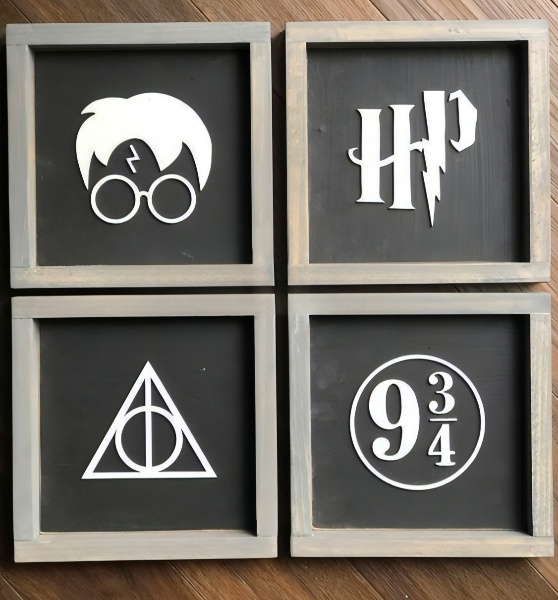
In this guide, we are providing a complete set of Harry Potter Wall Art vector files including DXF, SVG, CDR, and AI formats. These four iconic designs—the Boy Who Lived, the HP Logo, the Deathly Hallows, and Platform 9 ¾—are optimized for clean cutting and professional-grade finishing.
Why Vector Art is Essential for CNC and Laser Cutting
When working with machines like the Shapeoko, Glowforge, or industrial fiber lasers, the quality of your source file determines the quality of your finished product. Unlike raster images (JPG or PNG), vector files use mathematical paths. This means you can scale these Harry Potter designs from a small desk ornament to a massive wall installation without losing a single pixel of detail.
By offering these in DXF (Drawing Exchange Format) and SVG (Scalable Vector Graphics), we ensure compatibility with software like LightBurn, AutoCAD, CorelDRAW, and Adobe Illustrator.
A Closer Look at the 4 Magical Designs
1. The Boy Who Lived (Glasses & Bolt)
Perhaps the most recognizable silhouette in modern literature. This design captures Harry’s iconic round spectacles and the lightning bolt scar. It’s a minimalist masterpiece that works exceptionally well as a layered 3D piece.
2. The Classic HP Bolt Logo
The stylized “HP” with the lightning bolt “P” is a staple for any fan cave. This file is designed with sturdy bridges, making it ideal for both wood and metal cutting without losing the delicate curves of the “H.”
3. The Deathly Hallows Symbol
Representing the Elder Wand, the Resurrection Stone, and the Cloak of Invisibility, this geometric design is a favorite for CNC enthusiasts. The clean straight lines of the triangle and wand combined with the perfect circle of the stone make for a satisfying, symmetrical cut.
4. Platform 9 ¾ Sign
No Harry Potter collection is complete without the gateway to Hogwarts. This design features the classic serif typography encased in a circular border. It looks particularly stunning when cut from birch plywood and painted with a high-contrast black and white finish.
Technical Specifications & File Formats
We understand that different workshops use different software. That is why this pack includes:
- DXF: The industry standard for CNC routers and CAD software.
- SVG: Perfect for web-based laser software like Glowforge or Cricut Design Space.
- CDR (CorelDRAW): Ideal for users who prefer the precision of Corel for layout and design.
- AI (Adobe Illustrator): The gold standard for graphic designers specializing in vector manipulation.
Pro Tip: For the best results on a CNC router, we recommend using a 1/8″ or 1/16″ down-cut end mill to prevent splintering on the top surface of your plywood.
Step-by-Step Guide to Creating Your Harry Potter Wall Art
Step 1: Material Selection
For the look featured in our gallery, we recommend using 6mm or 9mm MDF or Birch Plywood. Plywood offers a beautiful grain that looks great when stained, while MDF provides a perfectly smooth surface if you prefer a solid painted look.
Step 2: Preparing the File
Import your chosen format (SVG or DXF) into your CAM software. If you are using a laser cutter, ensure your “Cut” layers are set to a high-power, low-speed setting to get through the wood cleanly. If you are using a CNC, remember to set your “Tabs” so the small inner pieces of the “9” and “4” don’t fly out during the process.
Step 3: Sanding and Finishing
Once the magic happens and the machine finishes its job, light sanding is required. Use 220-grit sandpaper to smooth the edges.
- For the Background: Use a dark charcoal or matte black paint.
- For the Icons: A bright white or metallic gold creates a striking contrast.
Step 4: Framing for a Professional Look
As seen in the image, these icons look best when mounted inside a “floating” frame. You can easily create these frames using scrap 1×2 pine boards. Simply glue the icon to a dark painted backing board and nail the frame around it.
Why These Files are a Must-Have
In the world of digital design, finding “free DXF files” that are actually high quality is a challenge. Many sites offer files that are “messy” with overlapping paths or too many nodes. Our files are manually cleaned and optimized for production. This means:
- Reduced Machine Time: Less “jitter” in the laser head.
- Cleaner Edges: Optimized curves for smoother transitions.
- Easy Scaling: Perfect for everything from keychains to large-scale wall art.
For more high-quality vectors, check out our [internal link: Library of Free CNC Files] to expand your workshop’s catalog.
Looking for a free DXF file to create stunning bird-themed metal wall art? Look no further! We are excited to share this exclusive Harry Potter Wall Art DXF file, perfect for CNC routers and laser cutting enthusiasts.
This intricate design is ideal for home decoration, garden walls, or as a unique gift idea. The file is free to download and easy to use. Whether you’re a hobbyist or a professional, this design will add a creative touch to your projects.
Key Features:
- Format: DXF
- Compatible with most CNC machines
- Intricate and detailed bird design
- Ideal for metal, wood, or acrylic cutting
Download Free Bird Decoration DXF File
Don’t forget to check out our collection of Free DXF Files for more amazing designs!
Backlink Section:
If you enjoy this free DXF file, consider visiting our partner site Metalshaus for high-quality metal wall art and custom designs.
Click the button to download!
Selling Your Creations on Etsy
If you are a professional designer or CNC operator, these files represent a massive business opportunity. Harry Potter remains one of the highest-searched terms on platforms like [External Link: Etsy.com]. By using these free files, you can create a physical product that retails for $40–$100 as a set of four.
To succeed on Etsy, focus on “Custom Fiber Laser Services” or “Handmade Wooden Decor.” Using high-quality keywords like “Wizarding World Wood Art” or “Minimalist Potter Wall Decor” will help your shop gain visibility.
Frequently Asked Questions (FAQ)
Q: Can I use these files for metal cutting? A: Absolutely. These DXF files are perfect for plasma, waterjet, or fiber laser cutting. If cutting in steel, we recommend a thickness of at least 14 gauge for durability.
Q: Which software should I use to open the SVG? A: SVG files are very versatile. You can use free software like Inkscape, or professional tools like Adobe Illustrator and LightBurn.
Q: Are these files ready for 3D printing? A: While these are 2D vector files, you can easily “extrude” them in software like Fusion 360 or Blender to create 3D printable STL files.
Final Thoughts
Adding a touch of magic to your home or shop has never been easier. With these free DXF, SVG, CDR, and AI files, you have everything you need to start your next CNC project. The combination of classic iconography and modern fabrication techniques results in a timeless piece of art.