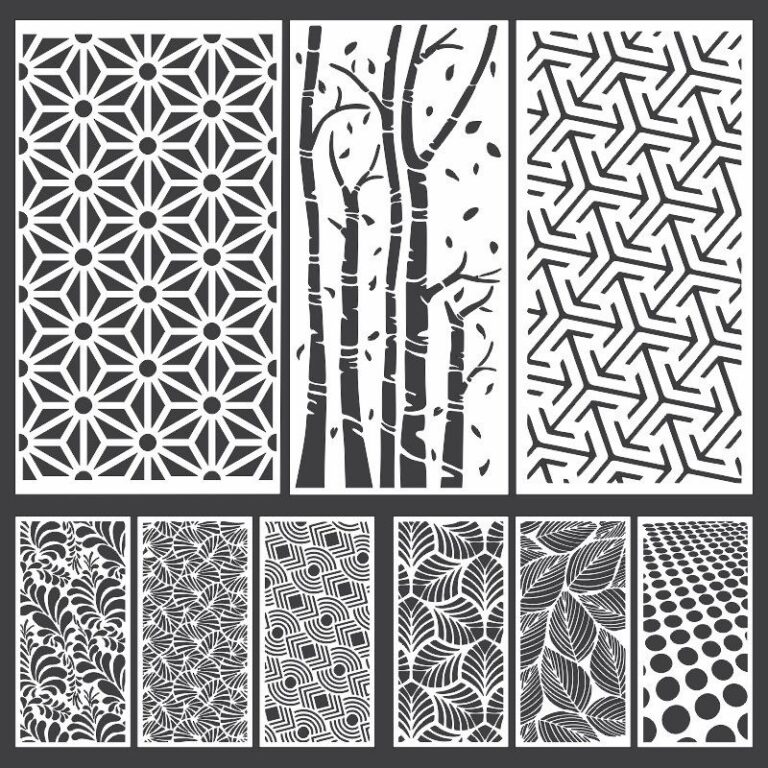
Plasma door cutting DXF files are highly in demand in the CNC fabrication industry, especially for creating modern metal doors, gates, and decorative entry panels. These designs not only provide security but also enhance the overall appearance of homes, offices, and commercial buildings.
If you are a CNC operator, fabricator, or designer, having high-quality DXF files for plasma cutting doors can significantly improve your workflow, save time, and increase your earning potential.
In this detailed guide, you will learn about plasma door DXF files, their uses, free download options, machine settings, materials, and expert tips.
What is a Plasma Door DXF File?
A plasma door DXF file is a vector-based design used by CNC plasma cutting machines to cut metal sheets into door patterns. These designs include intricate shapes, geometric patterns, Islamic art, floral designs, and modern abstract styles.
The DXF file contains:
- Cutting paths
- Dimensions
- Design structure
These files are compatible with software like:
- AutoCAD
- SheetCAM
- Fusion 360
- CorelDRAW
Free Download – Plasma Door DXF Files
You can download high-quality plasma door cutting DXF files for free from the link below:
Types of Plasma Door Designs
1. Modern Geometric Doors
Clean lines and abstract patterns for contemporary homes.
2. Islamic Pattern Doors
Traditional Arabic and Islamic art designs widely used in the Middle East.
3. Floral & Nature Designs
Stylish patterns with leaves, vines, and artistic shapes.
4. Security Door Designs
Heavy-duty designs with strong structure and minimal open space.
5. Custom Name & Logo Doors
Personalized doors with family names or business branding.
Best Materials for Plasma Door Cutting
Mild Steel (MS)
- Most common material
- Strong and affordable
Stainless Steel
- Rust-resistant
- Premium finish
Aluminum
- Lightweight
- Modern appearance
Recommended Thickness for Doors
- 1.5mm – 2mm: Decorative panels
- 2mm – 4mm: Standard doors
- 5mm+: Security doors
Plasma Cutting Settings for Door Designs
Thin Sheet (1–3mm)
- Amperage: 30–40A
- Speed: High
Medium Thickness (4–6mm)
- Amperage: 40–60A
- Speed: Medium
Thick Metal (8mm+)
- Amperage: 60–100A
- Speed: Slow
Additional settings:
- Pierce delay: Adjust according to thickness
- Torch height control (THC): Maintain consistent height
- Kerf compensation: Important for fitting accuracy
Fabrication Process
- Import DXF file into CAM software
- Set tool path and cutting parameters
- Load metal sheet on CNC plasma machine
- Start cutting process
- Clean edges and remove slag
- Apply paint or powder coating
- Install door frame and fittings
Tips for Professional Results
Use Clean DXF Files
Avoid double lines and open vectors.
Maintain Proper Kerf Settings
Ensures perfect fitting of door panels.
Choose Right Material Thickness
Depends on design and usage.
Finishing Matters
Grinding, polishing, and coating improve final look.
Common Mistakes to Avoid
- Using low-quality or unoptimized DXF files
- Incorrect scaling of design
- Ignoring material expansion due to heat
- Poor finishing after cutting
Internal Links
- https://dxffreefiles.com/free-dxf-plasma-files
- https://dxffreefiles.com/butterfly-clock-dxf-free-download
- https://dxffreefiles.com/cnc-wall-art-designs
External Links
SEO Tips for Selling Plasma Door Designs
If you want to sell door DXF files or finished products:
- Use keywords like “plasma door cutting dxf”
- Upload high-quality preview images
- Provide multiple file formats (DXF, SVG, AI, CDR)
- Offer custom door design services
Platforms to sell:
- Fiverr
- Etsy
- Personal website
Conclusion
Plasma door cutting DXF files are essential for modern metal fabrication. They allow you to create strong, stylish, and marketable door designs with precision and efficiency.
With free DXF downloads and the right machine settings, you can start your own CNC business or expand your current fabrication work.
👉 Download now and start creating professional plasma cut door designs today!