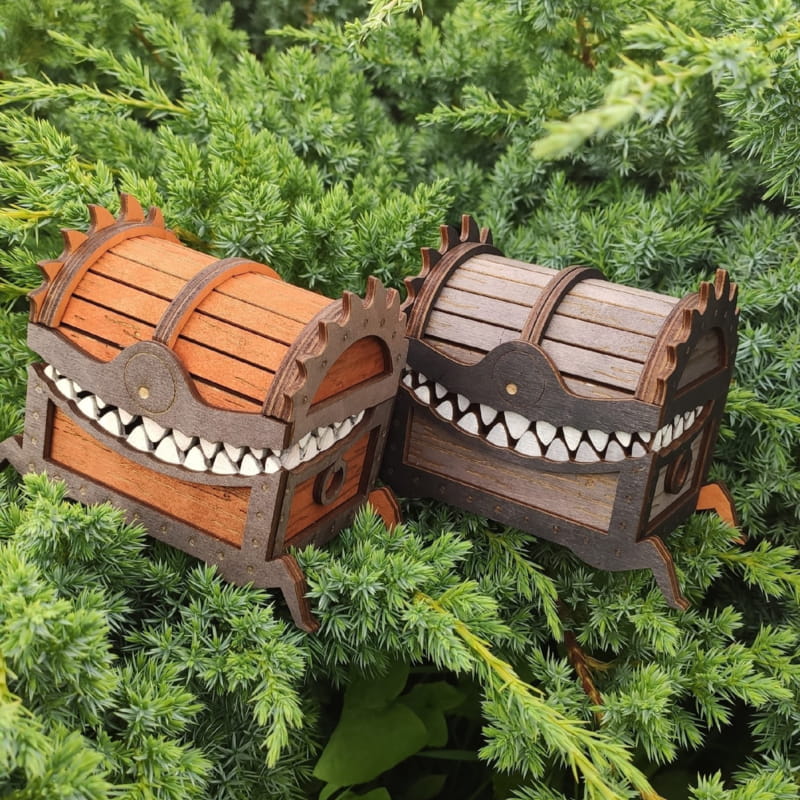
Are you a maker who loves Dungeons & Dragons? If you own a laser cutter like a Glowforge, xTool, or a CO2 laser, we have a special treat for you. Today, we are giving away the Digital Design Files for our popular Mimic Chest Dice Box—completely for free!
The Mimic is one of the most iconic creatures in tabletop RPG history. Known for disguising itself as a treasure chest, it’s the perfect theme for a dice storage box. Now, you can manufacture your own at home or in your workshop.
Why We Are Giving These Files Away for Free
The maker community thrives on sharing. We believe that every Dungeon Master and player should have access to cool gear without breaking the bank. By downloading these Free Laser Cut Files, you can customize the material, size, and finish to match your personal D&D setup.
File Specifications & Compatibility
Our design is optimized for standard laser cutting software (LightBurn, RDWorks, Adobe Illustrator, etc.). The download package includes:
- SVG Files: Best for Glowforge and web-based laser software.
- DXF Files: Perfect for AutoCAD and older CNC/Laser machines.
- PDF/AI Files: For those who want to tweak the design or add custom engravings.
Recommended Material Thickness: 3mm or 4mm Plywood/MDF. (Note: If you use a different thickness, remember to adjust the finger joints in the file.)
Step-by-Step Guide: How to Make Your Mimic Box
1. Preparation
Choose your wood. As you can see in our preview images, Oak, Cherry, or Walnut plywood looks incredible. You will also need wood glue and some white acrylic paint for the teeth.
2. Laser Cutting
Import the Mimic Chest SVG into your software.
- Red Lines: Set to ‘Cut’.
- Black/Blue Lines: Set to ‘Engrave’ or ‘Score’ for the wood plank texture.
3. Assembly
The box uses a tab-and-slot (finger joint) design. Start by assembling the base, then the lid. Glue the “teeth” layers behind the mouth frame before attaching the lid to the base.
4. Finishing Touches
To get the look in our photos, use a wood stain (like Honey or Dark Walnut). Paint the teeth bright white to make them “pop” against the dark wood.
Creative Ideas for Your Mimic Chest
Once you have the free files, don’t stop at just a dice box! You can:
- Scale it up: Make a massive Mimic to act as a prop for your live sessions.
- Add Magnets: Use small neodymium magnets to keep the lid snapped shut.
- Custom Engraving: Add your party’s name or your character’s stats on the back.
📥 Download Your Files Here
- File Name: Mimic_Dice_Box_Pack.zip
- Format: CDR
- License: Personal Use Only (Free)